
Getting Started with User Accounts
Overview
Loyalty platform users with the proper administrator privileges can create new platform User Accounts, and manage the existing User Accounts, within their Loyalty instance.
Roles
When creating or managing User Accounts, the administrator must assign one or more Roles to the User Account. A Role is a collection of permissions that controls what features or resources a user can access, and what actions they can perform (view, create, update, and so forth).
For more information on Roles, see Getting Started with Roles.
Business Units
If Business Units have been enabled in your Loyalty account, the administrator can assign a User Account to one or more Business Units. Business Units let you separate your Member data into multiple brands or subsidiaries within a single Loyalty platform environment.
For more information on Business Units, see Getting Started with Business Units.
Note: Business Units are an optional feature that must be enabled in your Loyalty account. Speak with your Zeta team for more information on enabling this feature.
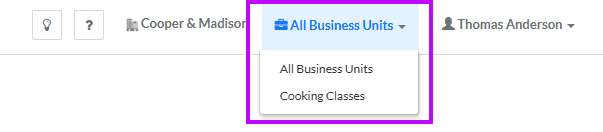
If a User Account has been assigned to multiple Business Units, they can switch their Business Unit context using the menu in the top-right corner of any Loyalty screen.
Places
Within the Loyalty platform, Places represent geographical locations that are of interest to your brand, such as stores, restaurants, or kiosks. An administrator can optionally assign a User Account to one or more Places.
For more information on Places, see Getting Started with Places.
Access
The Console Users screen is used to view, create, and manage the User Accounts in your Loyalty instance. To access the Console Users screen, select Admin from the top navigation bar, then select Access > Console Users from the side navigation menu.
For more information on the search options available on the Console Users screen, please see Search for a User Account.
Exports
The platform does not support the export of User Accounts from the Loyalty platform.
Imports
The platform does not support the import of User Accounts into the Loyalty platform.
Quick Links
 View a User Account View a User Account |
 Create a User Account Create a User Account |
 Assign a Role to a User Account Assign a Role to a User Account |
